Understanding how Polylang manages multilingual content at the database level is essential for developers building advanced translation tools or debugging translation issues. After extensive research into Polylang’s architecture, we’ve mapped out exactly how this popular WordPress multilingual plugin organizes language data and translation relationships.
The Foundation: WordPress Taxonomy Tables
Polylang leverages WordPress’s native taxonomy system in a clever way. Instead of creating custom tables, it uses the existing wp_term_relationships and wp_term_taxonomy tables to store both language assignments and translation relationships. This approach keeps the database structure lean while providing powerful functionality.
How Posts Are Linked to Languages
When a post is assigned a language, Polylang creates entries in the wp_term_relationships table. Here’s the process:

Step 1: Language Assignment
A post (e.g., ID 7834) has a corresponding object_id in wp_term_relationships with multiple rows, each having a different term_taxonomy_id. To identify the language, you:
- Find matching rows in
wp_term_taxonomywhere the taxonomy equals'language' - Extract the
descriptioncolumn, which contains serialized language data
The description field contains data like:
a:4:{s:9:"fallbacks";a:0:{}s:6:"locale";s:5:"en_US";s:3:"rtl";i:0;s:9:"flag_code";s:2:"us";}To filter posts by language, you simply check if the term_taxonomy_id matches the specific language term (e.g., 140 for English).
Step 2: Translation Relationships
Translation links between posts use the same table structure with a different taxonomy:
- Query
wp_term_taxonomywhere taxonomy equals'post_translations' - The
descriptioncolumn contains all translation IDs
A typical result looks like:
a:3:{s:2:"en";i:7834;s:2:"de";i:7859;s:2:"nl";i:7860;}This serialized array maps language codes to post IDs, creating the translation group.
How Terms (Categories/Tags) Handle Languages
Terms follow a similar but slightly different pattern:
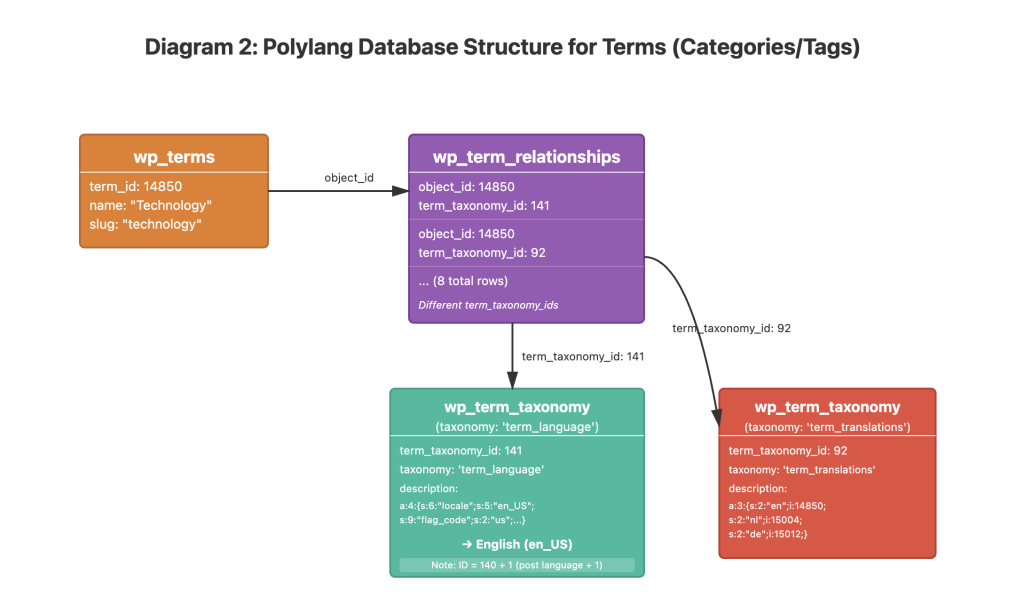
Language Assignment for Terms
For a term with ID 14850:
- Multiple rows exist in
wp_term_relationshipswith differentterm_taxonomy_idvalues - The matching entry in
wp_term_taxonomyhas taxonomy'term_language'(note: not just'language') - The
term_taxonomy_idfor term languages is typically the post language ID + 1 (e.g., if posts use 140, terms use 141)
Term Translation Relationships
Translation relationships for terms use:
- Taxonomy value
'term_translations'inwp_term_taxonomy - The same serialized array format in the
descriptioncolumn:
a:3:{s:2:"en";i:14850;s:2:"nl";i:15004;s:2:"de";i:15012;}Why This Matters for Advanced Translation Tools
Understanding this database structure is crucial for building sophisticated translation features. When we developed the polylang ai bulk translator for our Polylang AI Automatic Translation plugin, this deep knowledge allowed us to:
- Efficiently query and process large batches of untranslated content
- Maintain proper translation relationships across posts, pages, and taxonomies
- Handle complex page builder structures while preserving Polylang’s data integrity
- Create translation jobs that work seamlessly with Polylang’s architecture
Key Takeaways
- Polylang uses WordPress’s native taxonomy system for storing multilingual data
- Posts use
'language'and'post_translations'taxonomies - Terms use
'term_language'and'term_translations'taxonomies - All language and translation data is serialized in the
descriptioncolumn ofwp_term_taxonomy - The
term_taxonomy_idserves as the link between content and its language/translation data
This architecture is elegant in its simplicity, but understanding it fully requires diving into the database structure. For plugin developers working with Polylang, this knowledge is invaluable for creating tools that integrate properly with the multilingual ecosystem.