Version 4.10 is here, and it tackles one of those annoying things you’ve probably run into: internal links pointing to the wrong language after translation.
The Problem
When you translate a page that links to other pages on your site, those links still point to the original language. So your Spanish page might have links going to English pages. Until now, you had to fix those manually.
What We Tried Before
In an earlier version, we tried having the AI handle link replacement during translation — basically letting the LLM look up and swap links as it translated. But this had two problems: the AI wasn’t always accurate in resolving the right URLs, and it only happened once during translation. So if the linked pages weren’t translated yet at that moment, the links would never get updated afterwards.
How It Works Now
We completely rebuilt this with a different approach. Instead of relying on the AI, the plugin now handles link replacement itself — reliably and repeatedly.
Every time a translation completes, the plugin scans the translated content for internal links and replaces them with their translated equivalents. If you translated a blog post that links to your “About” page, and your “About” page already has a Spanish version, the link automatically updates to point to the Spanish version.
What If the Linked Page Isn’t Translated Yet?
That’s the smart part. The plugin remembers which links it couldn’t resolve and retries automatically in the background. So let’s say you translate your blog post today, but your “About” page gets translated next week — the link will update itself as soon as the translation becomes available. No action needed from you.
Manual Control
In the single post translator sidebar, there’s a new “Translate Internal Links” button. Hit it anytime to scan that specific translation for links that need updating. Useful if you want to check a particular page right away.
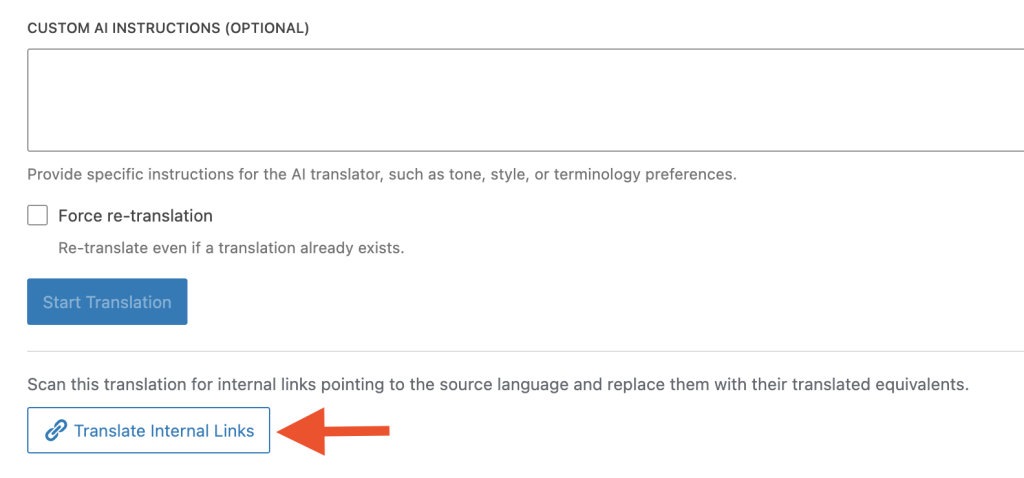
There’s also a new checkbox in the AI Translation settings tab to turn internal link translation on or off. It’s enabled by default.

Other Improvements
- Improved error logging
- Better stability for the background translation system
Update Now
This update is available now for all customers. Go to Plugins → Updates in your WordPress admin, or download the latest version from your customer dashboard.
If you’re not using Polylang AI Translation yet, check it out here.