The real difference between translation and localization comes down to this: translation swaps words, but localization swaps the entire experience. It’s the difference between being understood and truly connecting with someone. If you're planning a global strategy for your WordPress site, getting this right from the start is non-negotiable.
Think of translation as the what and localization as the how. One gives you the right words; the other makes those words feel right.
Why Just Translating Your Content Doesn't Work
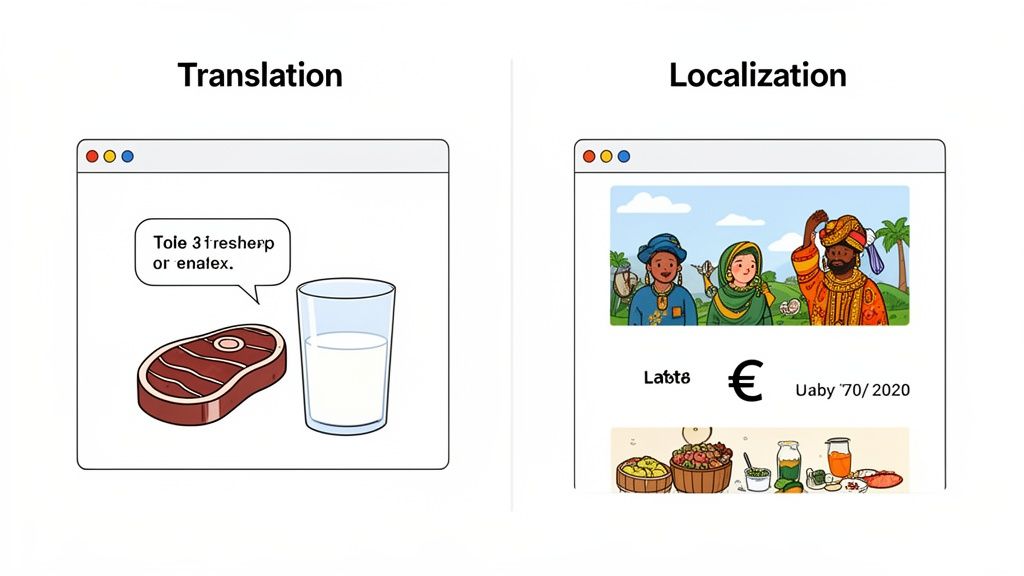
Imagine you’ve cooked a perfect, juicy steak and served it with a big glass of milk. Separately, they’re great. But together? The pairing just feels off. That’s exactly how a direct, word-for-word translation lands with a new audience. The words might be technically correct, but the cultural context is completely missing, creating an awkward experience that can erode trust.
Simple translation is a mechanical process. It gets the text from language A to language B, but it often leaves the heart and soul of the message behind.
The Hidden Price of a Bad Translation
A direct translation isn't just awkward; it can actively harm your brand. Language and culture are inseparable, and what lands perfectly in one country can be confusing, irrelevant, or even offensive in another.
Here are a few classic ways a simple translation can backfire:
- Lost Humor and Idioms: That clever, pun-filled headline you love in English? It probably turns into nonsense in Japanese. Sarcasm, cultural references, and common sayings almost never survive a direct translation.
- Cultural Blind Spots: A thumbs-up gesture is a sign of approval in the West, but it's a deeply offensive insult in parts of the Middle East. The images and symbols you use matter just as much as your words.
- Wrong Tone and Formality: The subtle difference between using the formal "usted" versus the informal "tú" in Spanish can make your brand sound either stiff and unapproachable or disrespectful and unprofessional.
Localization: Creating a Truly Native Feel
Localization is the fix. It’s a complete overhaul that adapts every single part of your website to feel like it was built specifically for the local market. It's about more than just words on a page; it’s about crafting a seamless user experience. You can read a full breakdown of what localization means, but it boils down to one key idea.
Localization is the process of adapting a product or content to a specific locale or market. It involves much more than just translating text; it means modifying the entire user experience to meet the cultural, functional, and linguistic expectations of the target audience.
This is what builds real, authentic connections with people. It means thinking about everything: date formats (MM/DD/YYYY vs. DD/MM/YYYY), measurement units (imperial vs. metric), currencies, local payment options, and even customer support hours. The goal is to erase any sign that your WordPress site was originally made for a different audience.
This isn't just a website problem, either. The same principles drive global success everywhere, as seen in the critical role of mobile app localization in the app stores. When you shift your mindset from making your content understandable to making it genuinely resonate, localization becomes your most powerful tool for growth.
How Localization Gives Your SEO a Serious Boost
If you want to reach a global audience, your website needs to do more than just speak multiple languages—it has to be discoverable. While translation makes your content understandable, it’s localization that actually makes it rank. Think of it as the secret weapon for international SEO, because it directly improves the user experience signals that search engines like Google absolutely love.
When someone lands on your site and finds content that uses familiar terms, reflects their culture, and just feels right, they stick around. They engage. And that's where the real SEO benefits kick in.
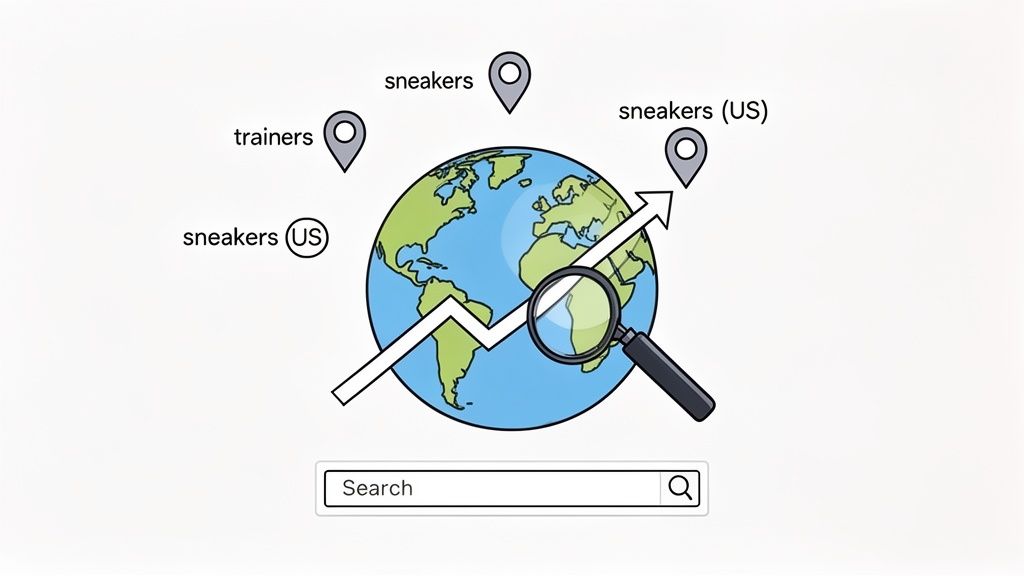
This positive engagement sends a powerful message to search engines. When Google sees lower bounce rates and longer time on your page, it concludes that your site is a high-quality, relevant answer for that local search. The result? A significant bump in your rankings for that specific region.
The Power of Localized Keyword Research
One of the most common missteps in multilingual SEO is just translating your keywords word-for-word. That’s a huge mistake. Effective international SEO starts by accepting that people in different countries search for the exact same thing using completely different words. This goes way beyond basic translation and localization.
For example, a shoe company targeting the UK with the keyword "sneakers" would completely miss the mark. Over there, the go-to term is "trainers." Likewise, an American looking for a "vacation" is searching for the same thing as a Brit looking for a "holiday."
True localization means thinking like a local. It’s about stepping into your customer's shoes and using the exact words they would use, not just a clunky translation of your own.
This is why localized keyword research isn't just a "nice-to-have"—it's non-negotiable. You have to dig in and find the unique search terms, slang, and phrases people actually use in each market. Only then can you start capturing valuable organic traffic. For a deeper dive, check out our complete guide on multilingual SEO best practices.
Nailing the Technical SEO Details
Great content isn't enough; your global strategy needs a rock-solid technical foundation. Search engines need crystal-clear signals to figure out which version of your page should be shown to which user. This is where hreflang tags become your best friend.
An hreflang tag is a simple snippet of code that tells search engines like Google, "Hey, this page has a German version over here and a Spanish one over there." When implemented correctly, they ensure a user in Germany sees your German page and a user from Spain sees the Spanish one. It's a simple concept, but it's critical for preventing duplicate content issues and serving the right experience to the right person.
Choosing the Right URL Structure
How you organize your multilingual content also has a massive impact on your SEO. Your URL structure is a clear signal to both users and search engines about the geographic focus of your site. You generally have three solid options:
-
Country Code Top-Level Domains (ccTLDs): Think
yourbrand.defor Germany oryourbrand.frfor France. This is the strongest possible signal you can send to search engines about a site's target country. -
Subdirectories: This looks like
yourbrand.com/de/for Germany oryourbrand.com/fr/. It's often much easier to manage and keeps all your SEO authority consolidated under one domain. -
Subdomains: This approach uses URLs like
de.yourbrand.comorfr.yourbrand.com. It's another popular method, though it can sometimes split your SEO authority more than a subdirectory structure would.
Your choice here will depend on your budget, technical know-how, and long-term vision. But having a clear, consistent structure is crucial for any international SEO plan that's built to last. The explosive growth of the global translation and localization industry shows just how vital this is. The market was valued at around £31.7 billion and is projected to soar past £38 billion by 2033. The data backs it up: Fortune 500 companies that truly invest in localization are 2.04 times more likely to see their profits increase. You can discover more insights about these industry stats on alphatrad.com.
Scaling Your Global Content with AI Translation
Let's be honest: manually translating an entire website—with its hundreds of pages, blog posts, and product descriptions—is a Herculean task. The sheer time, cost, and coordination involved can make global expansion feel like a distant dream for many businesses. This is where modern, AI-powered translation completely changes the game, offering a practical and scalable path forward.
Forget the clunky, word-for-word translations of the past. Today's advanced AI models from providers like OpenAI, Gemini, and Claude deliver nuanced, context-aware outputs that capture subtle tones and meanings. High-quality multilingual content is no longer out of reach. To really grasp how this works, it helps to understand the basics of Natural Language Processing applications.
The Human-in-the-Loop Strategy
The smartest way to approach this today is with a human-in-the-loop strategy. Think of it as the best of both worlds: you get the raw power and speed of AI, combined with the irreplaceable expertise of a human linguist. It’s a workflow that delivers both speed and quality without compromise.
Here’s a breakdown of how it works in practice:
- AI Does the Heavy Lifting: The AI gets the first pass, handling the initial 80-90% of the translation. It can process massive volumes of text in a fraction of the time a human could, creating a solid and surprisingly accurate foundation to build on.
- Human Experts Add the Polish: Professional translators then step in to review and refine the AI's work. They’re looking for those subtle cultural nuances, making sure the brand voice is spot-on, and adding that final layer of polish that builds real trust with a local audience.
This hybrid approach slashes the manual effort once required for both translation and localization. A process that used to take weeks or even months can now be wrapped up in just hours or days.
The Engine Behind Modern Translation
For anyone running a WordPress site, this entire workflow can be powered by tools that plug right into your dashboard. A plugin like the Polylang Automatic AI Translation plugin acts as the engine, connecting your website to powerful AI models and automating the entire process.
Instead of a soul-crushing copy-and-paste routine, you can bulk-translate posts, pages, WooCommerce products, and even tricky custom fields with just a few clicks.
This screenshot shows just how simple it is to hook your WordPress site into different AI providers. From one central spot, you can manage costs, pick the right AI model for the job, and even use custom prompts to keep your brand voice consistent across every language. If you're curious about the tech making this all possible, you can dive deeper in our article on what neural machine translation is.
A Seismic Shift in the Industry
The move toward machine-assisted translation isn't just a trend; it's a revolution. It’s quickly becoming the standard for any business serious about managing global content efficiently. Recent industry data confirms this massive shift, showing that machine-assisted translation now powers a staggering 70% of all language projects. Better yet, it can slash costs by up to 90% by cutting out human errors and manual overhead.
This data highlights a crucial point: AI is no longer just a cost-saving tool, but a genuine strategic asset. Adopting an AI-powered workflow lets you enter new markets faster, respond to customer needs more quickly, and maintain a consistent brand message at a global scale.
By blending the incredible speed of AI with the critical oversight of human experts, you can build a localization process that is scalable, efficient, and, most importantly, high-quality. This is how you ensure your message doesn't just reach a global audience—it truly resonates with them.
Your Guide to Localizing a WordPress Site
Alright, let's get down to brass tacks. Moving from a global strategy to actually making it happen on your WordPress site is where the real work begins. It can feel like a massive undertaking, but the tools available today have made the whole process much more manageable. This guide will walk you through the practical steps to transform your single-language website into a multilingual hub that connects with a global audience.
The backbone of any good WordPress localization project is getting the technical side right. You need a solid multilingual plugin to juggle the different language versions and a powerful translation engine to handle the heavy lifting. This is exactly where a combination like the popular Polylang plugin and a smart add-on like the Polylang Automatic AI Translation plugin comes into play.
What's great about this kind of setup is that it keeps everything inside your WordPress dashboard. Forget the old, clunky process of exporting content, emailing it to translators, and then painstakingly re-importing everything. Instead, you can translate pages, posts, and even tricky custom content with just a few clicks.
Handling Complex Content Structures
Let's be honest—most modern WordPress sites are more than just a collection of simple posts and pages. They're intricate systems built with page builders and custom fields, which can be a real headache for basic translation tools. A real localization strategy has to account for every single word a visitor sees.
This is why having a deeply integrated plugin is non-negotiable. It needs to be smart enough to find and translate text that's tucked away in all sorts of places:
- Page Builder Widgets: If you're using page builders like Elementor or Bricks Builder, your content is spread across dozens of widgets and elements. A good translation tool can dive into those headlines, buttons, and text blocks and translate them on the spot.
- ACF Custom Fields: Advanced Custom Fields (ACF) is a fantastic tool for adding structured data, but that data needs to be translated, too. A capable plugin will automatically spot these fields and add their content to the translation queue, making sure everything from product specs to event details gets localized.
- WooCommerce Details: For anyone running an e-commerce store with WooCommerce, translating product titles is just the beginning. Your workflow has to cover product attributes, variations, shipping details, and all the fields in the checkout process to create a shopping experience that feels native to your international customers.
By making sure your tools can handle this complexity, you sidestep the all-too-common problem of a partially translated site. Nothing confuses a user or damages your credibility faster than a jumble of different languages on the same page.
Configuring Your AI-Powered Workflow
Once you've got your plugins installed, the next step is to set up your automated translation workflow. The goal here is to be efficient without sacrificing quality. This usually means connecting your site to an AI provider—like OpenAI, Gemini, or Claude—through the plugin’s settings.
A game-changing feature to look for is bulk translation. Instead of tackling your content one piece at a time, you can select hundreds of pages, posts, or products and translate them all at once. This absolutely slashes the manual workload, compressing what could be days or weeks of work into just a few hours.
The real magic of this setup is how well it scales. Whether you’re launching in one new language or ten, the process is the same. You can enter new markets faster and with a much smaller budget than was ever possible before.
Another powerful tool in your arsenal should be custom AI prompts. This feature lets you guide the AI's tone of voice to make sure it matches your brand. You can tell it to be formal or casual, to avoid specific industry jargon, or even to write from a certain persona. This level of control is what keeps your brand sounding like your brand, no matter the language.
The "human-in-the-loop" workflow below shows how you can blend AI's speed with essential human oversight.
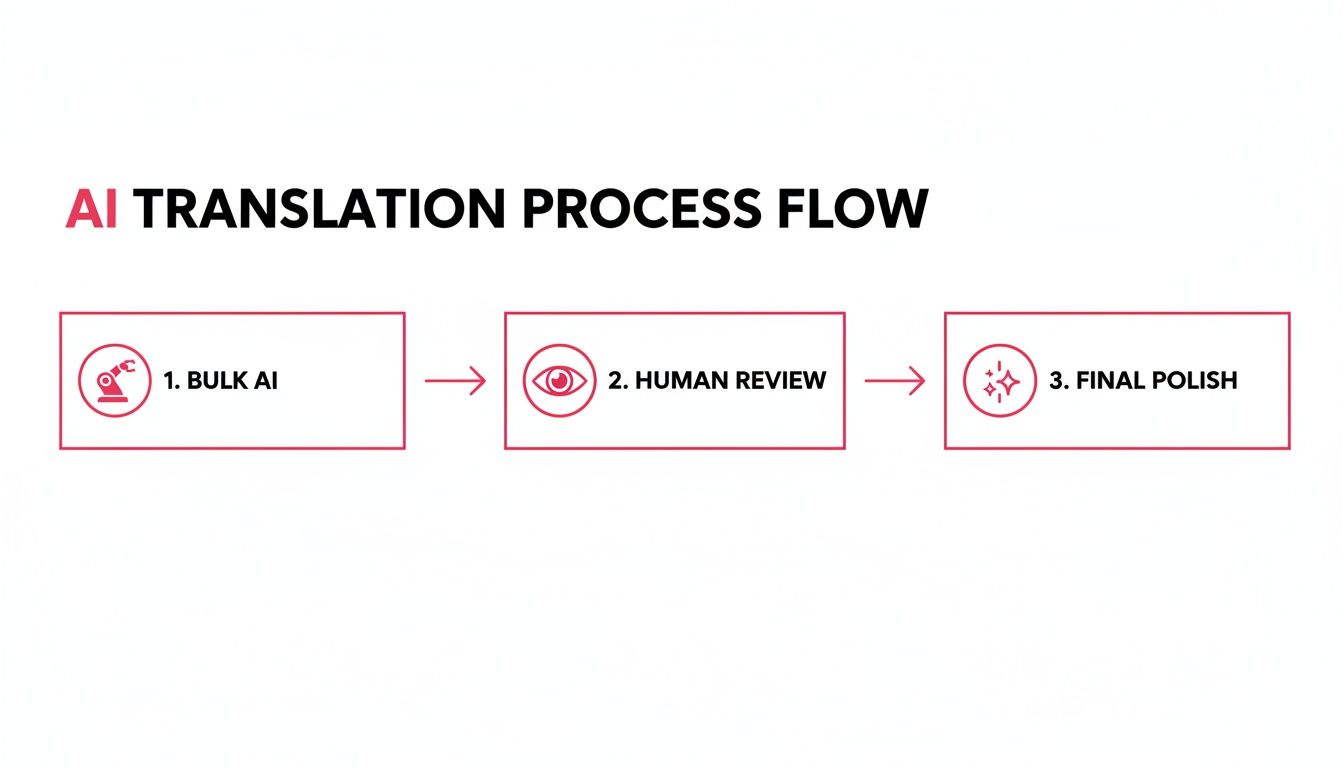
As you can see, the process is simple: AI does the initial heavy lifting, a human reviewer checks for cultural nuances and brand voice, and the result is a polished, professional final product.
Comparing Translation and Localization Workflows
Choosing the right approach comes down to your budget, quality standards, and how quickly you need to move. Each method strikes a different balance between cost, speed, and cultural accuracy. To make it clearer, here’s a breakdown of how the different workflows stack up.
Comparing Translation and Localization Workflows
| Aspect | Manual Translation | Basic Machine Translation | AI-Powered Localization (with Polylang Automatic) |
|---|---|---|---|
| Process | Export content, send to human translator, review, import. | Copy/paste content into a free tool, paste back, hope for the best. | Bulk AI translation within WordPress, followed by human review and editing. |
| Cost | High. Professional translators charge per word, which adds up quickly. | Very low or free. | Medium. AI costs are low, with additional budget for human review. |
| Speed | Slow. Can take weeks or months depending on content volume. | Very fast for the initial pass. | Fast. Bulk translation in hours, followed by efficient human review. |
| Outcome | High quality and nuanced, but slow and expensive to scale. | Prone to errors, lacks context, and can sound unnatural or unprofessional. | High-quality, culturally adapted content that's scalable and cost-effective. |
This table shows why the AI-powered localization model has become so compelling. It offers a "best of both worlds" solution, blending the efficiency of machine translation with the critical nuance that only a human can provide.
By following these steps—choosing the right tools, planning for complex content, and setting up an efficient workflow—you can roll out a powerful localization plan that turns your WordPress site into a truly global platform. Think of it this way: every investment you make in translation and localization is a direct investment in reaching new customers and fueling your international growth.
Localizing the Entire Customer Experience
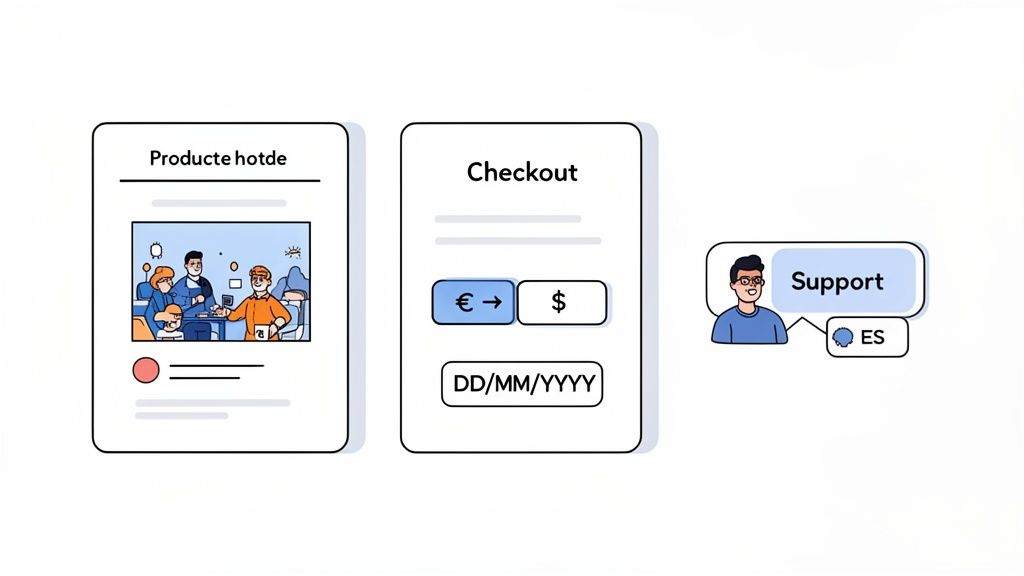
If you want to truly connect with a global audience, you have to think far beyond just translating the words on a page. Real translation and localization mean redesigning the entire customer journey so that every single interaction feels natural and native to that specific market. It’s about building a seamless experience that considers culture, context, and what your customers expect from the moment they land on your site to the post-purchase thank you email.
This holistic approach is what turns your website from a simple translated document into a welcoming, localized storefront.
Adapting Visuals and Graphics
Did you know the images, icons, and even colors on your site can send powerful cultural signals? What works perfectly in one country might be confusing or even off-putting in another. A key part of localization is auditing your visual assets to make sure they actually resonate with your target audience.
A classic example is the people you show in your photos. A marketing image featuring a typical North American family won't connect with an audience in Japan. Swapping that photo for one that feels culturally familiar creates an immediate sense of trust and shows customers you actually understand their world.
Localizing WooCommerce and E-commerce
For any online store, the checkout process is where localization becomes absolutely critical. A customer can love your products, but if they hit a wall with unfamiliar payment options or confusing currency conversions, they will abandon that cart in a heartbeat. The data doesn't lie: 75% of global consumers prefer to buy from sites that provide product information in their own language.
To keep those customers from bouncing, you need to nail these e-commerce elements:
- Currencies and Payment Gateways: Showing prices in the local currency isn't just a nice-to-have; it's essential. You also need to offer payment gateways that people in that region actually use. While PayPal is huge in the US, you'll need options like Alipay for China or iDEAL for the Netherlands to succeed in those markets.
- Dates and Units: It’s a small detail that makes a big difference. Formatting dates correctly (DD/MM/YYYY vs. MM/DD/YYYY) and using local units of measurement (like centimeters instead of inches) removes friction and makes your product specs instantly understandable.
- Shipping and Taxes: Be upfront about shipping options and local taxes in a format they recognize. This transparency prevents nasty surprises at checkout and builds the confidence needed to complete the purchase.
Providing Multilingual Customer Support
Your commitment to your local audience shouldn't stop once the sale is made. Offering customer support in their native language is the final, crucial piece of the puzzle. It proves you value their business and are ready to help if anything goes wrong.
True localization is about empathy at scale. It’s anticipating your customer’s needs and adapting your entire experience to meet them, creating a journey that feels effortless, intuitive, and designed just for them.
This doesn't mean you need a full-time support team for every language right away. You can start small by providing localized FAQs, offering email support with the help of translation tools, or even setting up chatbots trained in multiple languages. For WordPress site owners, managing everything from content to support is much simpler with tools like the Polylang Automatic AI Translation plugin, which helps keep your messaging consistent at every touchpoint.
By localizing these crucial elements, you move beyond just swapping out words. You create a customer journey that feels personal and trustworthy, turning international visitors into loyal customers.
How to Know if Your Global Strategy is Actually Working
So, you’ve invested time and money into translation and localization. How do you know it's actually paying off? Without a way to measure success, you're essentially flying blind. To make your global expansion a success, you need a clear framework for proving your return on investment (ROI) and using that data to make smarter decisions.
This goes way beyond just watching your website visitor count. It's about drawing a straight line from your localization efforts to your most important business goals. By tracking the right Key Performance Indicators (KPIs), you can prove the real-world value of speaking your customers' language.
What to Track: The KPIs That Matter
To get a real picture of your ROI, you need to watch how international audiences are actually interacting with your localized content. This is where the story of your success (or failure) is written, showing you what’s working and where the biggest opportunities are hiding.
Get started by keeping a close eye on these key metrics:
- Organic Traffic Growth by Country: Are you seeing more search traffic from your target regions? Jump into Google Analytics, filter your traffic by country, and see if your international SEO efforts are pulling people in.
- Conversion Rates per Language: Are visitors on your Spanish site converting better than those on the English one? This is a powerhouse metric that ties localization directly to sales and leads.
- Customer Lifetime Value (CLV) by Region: Do customers from Germany stick around longer or spend more than customers from France? A higher CLV in a new market is a huge win for your localization strategy.
- Lower Bounce Rates & More Time on Page: When people find content that truly speaks to them, they stay. If bounce rates are dropping in specific countries, you know your localized user experience is on point.
Shifting the Mindset: Localization as an Investment, Not an Expense
When you connect these KPIs back to what you initially spent, the conversation changes. You can prove that localization isn't just another line item on a budget; it's a strategic investment that opens up brand-new revenue streams.
The industry data backs this up loud and clear. The top localization firms are pulling in billions, and the entire market is on track to hit $75.7 billion. This boom is driven by smart businesses that get the incredible value of automating their multilingual approach. If you want to dive deeper into these trends, you can explore the full localization statistics on centus.com.
Investing in a solid localization workflow is a direct investment in your global brand. It tells international customers, "We see you, we value you, and we understand you."
This is where tools like the Polylang Automatic AI Translation plugin really shine. They're built to maximize this return by handling the grunt work automatically. This cuts down on costs, gets you into new markets faster, and gives you a serious leg up on the competition. It flips the script, turning localization from a cost center into a powerful engine for global growth.
Frequently Asked Questions
Jumping into WordPress translation and localization often brings up a few common questions. Let's tackle them head-on so you can feel confident about taking your site global.
What’s the Real Difference Between Translation and Localization?
Think of it this way: translation is about converting words. It's the straightforward process of taking text in one language and making it understandable in another. The focus is purely on getting the language right.
Localization, however, is about converting the entire experience. It goes way beyond just words. You're adapting everything—from images and cultural jokes to date formats and currency—so that your website feels like it was made specifically for that local audience. Translation changes what you say, while localization changes how it feels.
Can't I Just Use Google Translate on My WordPress Site?
While it's tempting to use a free tool like Google Translate for a quick fix, it's a huge risk for any professional website. These tools are great for getting the general idea of a foreign blog post, but they often spit out clunky, unnatural, or just plain wrong translations.
A machine translation that misses cultural nuance can easily damage your brand's credibility. It signals to visitors that you haven't truly invested in their experience. For a professional presence, you need a solution that maintains your brand voice and builds trust, not a tool that creates confusion.
How Does AI Handle Tricky Content from ACF or Elementor?
This is where most standard AI translation services hit a wall. They see a block of code from a page builder or a custom field and have no idea what to do with the text hidden inside. The result is often a messy, partially translated page that looks broken to your visitors.
That's why you need a tool built specifically for the WordPress ecosystem. A deeply integrated plugin like the Polylang Automatic AI Translation plugin knows exactly how to navigate these complex setups. It’s designed to find and translate content within:
- Elementor widgets and Bricks Builder elements
- Advanced Custom Fields (ACF)
- WooCommerce product descriptions, variations, and attributes
This kind of smart integration means every single piece of your site gets translated correctly, creating a seamless and professional experience for every user, no matter where they are.
Ready to stop wrestling with manual translations and start growing globally? At EPIC WP Solutions, we build AI-powered tools that turn days of tedious work into a few simple clicks. See how the Polylang Automatic AI Translation plugin can help you translate your entire WordPress site, effortlessly.