Ever wonder how a website instantly knows to show you prices in Euros instead of Dollars, or display a date in a format you immediately recognize? That’s not magic—it’s a locale at work.
Think of a locale as a digital passport for your software. It’s a simple, standardized code that tells an application everything it needs to know about a user’s language, region, and cultural conventions, all in one neat package.
What Exactly Is a Locale?
At its most basic, a locale is a set of instructions that tells a program how to present information in a way that feels completely natural to a specific user. It’s a shorthand that bundles together several critical pieces of information, allowing your website to communicate clearly with people all over the world.
While the term sounds a bit technical, the idea behind it is all about user experience. It’s about speaking your user’s language, both literally and culturally.
This goes way beyond just translating words on a page. A properly set-up locale handles all the subtle but vital details that build trust and make a site feel intuitive. These details include things like:
- Language: The primary language for the user interface, like English, Spanish, or Japanese.
- Country or Region: The specific geographical area, which affects dialects, phrasing, and local customs.
- Currency: Showing prices in the correct local currency, whether that’s €, £, or ¥.
-
Date and Time Formats: Displaying
MM/DD/YYYYfor a user in the US versusDD/MM/YYYYfor someone in the UK.
A locale isn’t just about what you say, but how you say it. It’s the difference between an experience that feels foreign and one that feels like it was built just for the user.
For any business with an online presence, getting locales right is non-negotiable. This is especially true in the WordPress world, which powers an incredible 43.5% of all websites. Think about e-commerce stores built on WooCommerce—which holds a massive 33% share of the global market. For them, a bad locale setup means showing dollars to shoppers in Europe or using confusing date formats. Both are quick ways to lose a sale. You can dig into more WordPress statistics on Hostinger.com.
Ultimately, the locale is the cornerstone of a personalized user experience. It’s the engine that powers everything from a simple blog to a global online store, making sure every visitor feels seen and understood. Getting a handle on this concept is the first step in the broader journey of digital adaptation, which we cover in our guide on what localization means.
Decoding Locale Formats and BCP 47 Standards
For any of this to work, computers need a standardized way to write down a locale. It’s a bit like an international mailing address—every country has its own quirks, but the fundamental pieces (like a name, street, and city) are always there so the mail gets delivered. In software, these formats give every language and region combo a clear, machine-readable identity.
One of the most common formats you’ll run into looks like language_COUNTRY. Here, the language is a two-letter lowercase code from the ISO 639-1 standard, and the country is a two-letter uppercase code from ISO 3166-1.
For example, en_US tells a system we’re dealing with English (en) as spoken in the United States (US). You’ll see this old-school format all over the place, especially in older programming environments and operating systems.
Understanding BCP 47 Language Tags
While language_COUNTRY is common, the real gold standard for the modern web is BCP 47. This is a set of rules maintained by the Internet Engineering Task Force (IETF) that offers a much more powerful and flexible way to define locales. The most obvious change? It uses hyphens instead of underscores, but the real magic is in the extra details it can handle.
A typical BCP 47 tag might look like language-script-REGION. This structure allows for incredible precision, which is absolutely vital for languages with multiple writing systems or significant regional variations.
A locale code isn’t just technical jargon; it’s the specific instruction that tells software how to create a culturally relevant user experience. Getting it right is the first step toward effective global communication.
Let’s look at a few examples to see how this plays out in the real world.
-
en-GB: This specifies English (en) for Great Britain (GB). It’s the key to making sure your British visitors see spellings like “colour” instead of “color” and dates in the DD/MM/YYYY format they expect. -
fr-FR: This targets French (fr) speakers in France (FR). It’s what tells the software to use a comma as the decimal separator, so 1,234.56 shows up as 1 234,56. -
es-MX: This pinpoints Spanish (es) for users in Mexico (MX), which accounts for different vocabulary and currency conventions than what you’d find in Spain (es-ES). -
zh-Hans-CN: This is a perfect showcase of BCP 47’s power. It precisely defines Chinese (zh), written in the Simplified (Hans) script, specifically for people in mainland China (CN).
This diagram really helps visualize how all these pieces fit together.
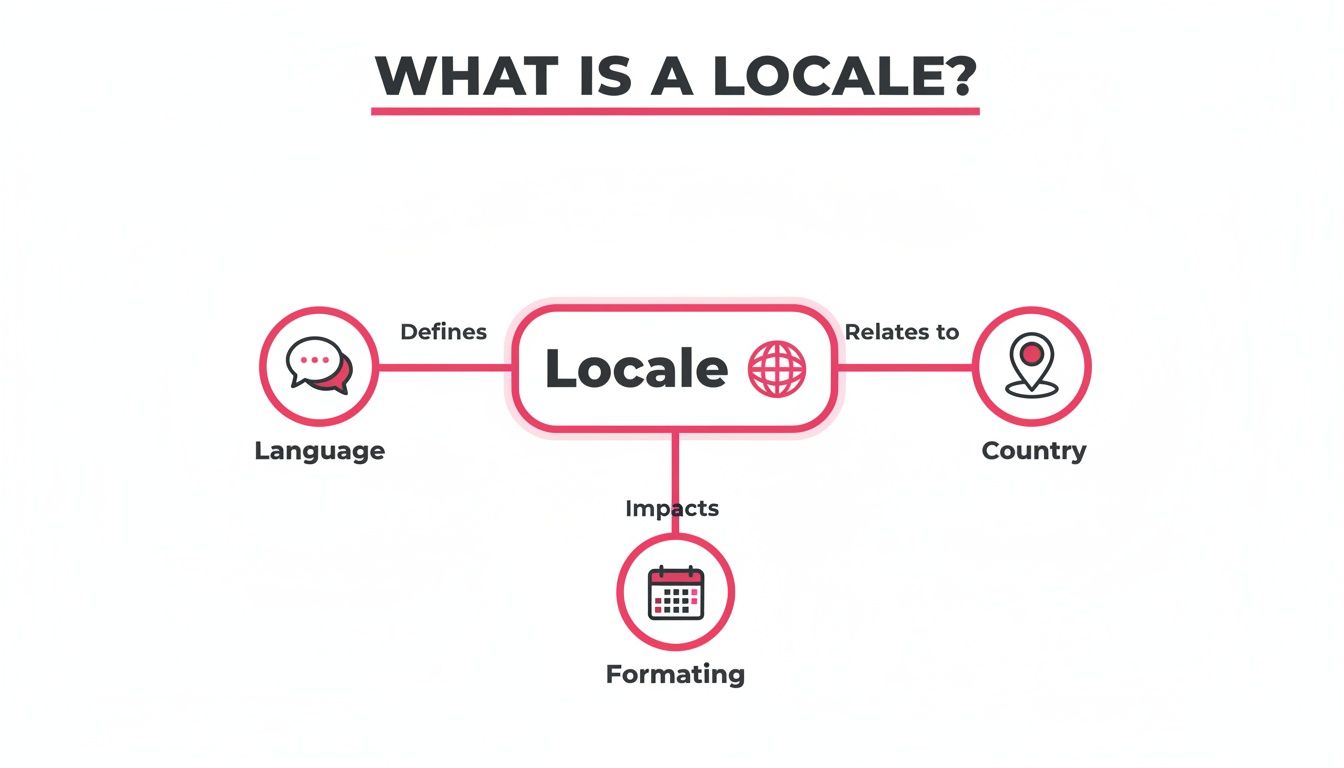
As you can see, a single locale identifier is a neat little package that bundles language, country, and all the associated formatting rules. Getting comfortable with these codes is the key to setting up your website with the precision needed to connect with any audience, anywhere.
How Your Website Uses Locales to Serve Content
Okay, so we’ve covered what a locale is in theory. But how does this all work in practice? The real magic happens when your website takes this information and uses it to instantly personalize the experience for a visitor. This isn’t a manual switch you flip; it’s a lightning-fast, automated conversation between a user’s device and your web server.
Let’s say a visitor from London opens up their browser. Their computer and browser are likely set to British English, or en-GB. When they type in your website’s address, their browser sends a small but crucial piece of information along with the request to view your page. This little messenger is called the Accept-Language header.
Think of it as the browser’s introduction to your server. It politely says, “Hi there, my user prefers content in British English. Do you have anything that fits?”
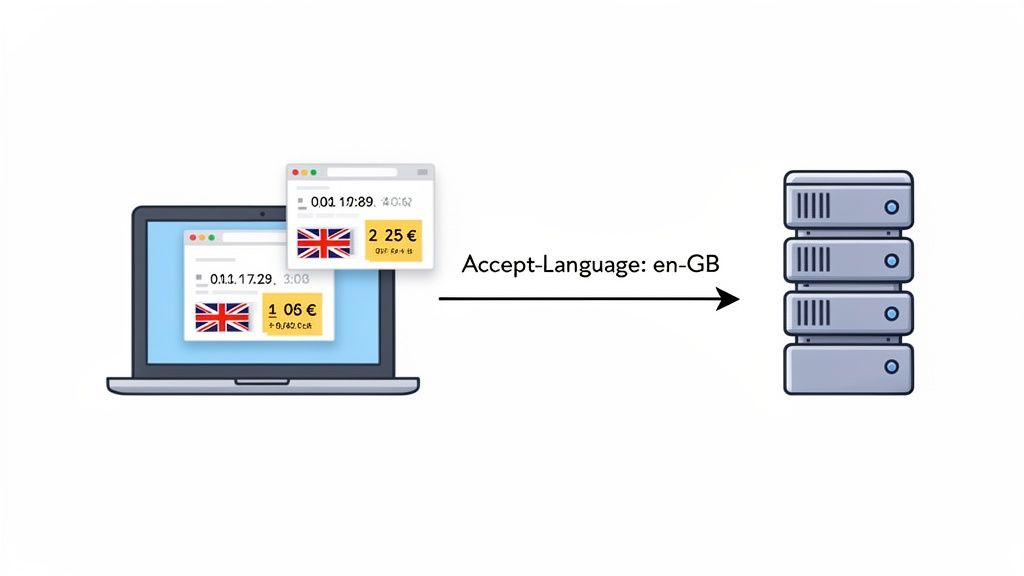
From Request to Response
Your WordPress site receives this request and immediately looks at the Accept-Language header. If your site is set up for multiple languages and you have an en-GB version of that page ready to go, it knows exactly what to do. It serves up the British English version instead of defaulting to, say, American English (en-US).
This automatic negotiation is the bedrock of a good international user experience. It means the very first thing a visitor sees feels like it was made for them. The dates make sense, the currency is familiar, and the spelling is right—all without them ever having to hunt for a language switcher.
The
Accept-Languageheader is the unsung hero of web localization. It’s a simple HTTP header that bridges the gap between a user’s preferences and your website’s ability to meet them, creating a personalized experience from the very first page load.
The whole back-and-forth happens in a blink of an eye, following a few key steps:
-
User Preference: A user’s operating system (like Windows or macOS) and their browser (Chrome, Firefox, etc.) are set to a default locale, maybe
fr-CAfor French in Canada. -
Browser Request: When they navigate to your site, their browser automatically sends the
Accept-Language: fr-CAheader along for the ride. - Server Interpretation: Your web server, running a multilingual plugin like Polylang, reads this header.
-
Content Delivery: The server matches the
fr-CArequest to the correct version of your content and serves it up.
This entire exchange is completely invisible to the user. From their perspective, your website “just works.” The content feels natural and trustworthy, which is the first and most important step toward building a global audience.
Putting Locales to Work on Your WordPress Site
Alright, let’s move from the “what” to the “how.” Knowing what a locale is is one thing, but actually putting it to work on your WordPress site is where your global strategy starts to feel real. This is the practical step that transforms a standard website into a platform that truly speaks to people, wherever they are.
WordPress itself gives you a great starting point. When you head over to Settings > General and pick a language, you’re setting the main locale for your entire site. This one choice tells WordPress to load the right language for your admin dashboard, your theme’s default text, and even the interface of your plugins.
Behind the scenes, this is all powered by special translation files, specifically .po and .mo files. Think of them as the language packs for WordPress. Well-built themes and plugins come with these files for various locales, which is why your site can magically display its built-in text in the right language.
Mapping Site Languages to Locales
Getting this mapping right is fundamental. While WordPress handles your site’s primary language easily, building a true multilingual experience means taking more control. You need to explicitly connect a version of your content to a specific locale code, like en-GB for British English or es-MX for Mexican Spanish.
This is where a good Multilingual WordPress Plugin becomes essential. These tools extend what WordPress can do out of the box, letting you create and manage separate content for each audience you want to reach.
Don’t underestimate how critical this is. In the world of computing, the locale is the key to internationalization (i18n), and for the 472 million websites running on WordPress, it’s everything. With WordPress dominating 62.8% of the CMS market, its ability to support global audiences through locale-aware plugins is a huge part of its success.
Getting Past Common Formatting Roadblocks
One of the stickiest challenges isn’t just translating words—it’s getting the little details right. Simply switching the language isn’t enough. You have to make sure every locale displays information in a way that feels natural to the user.
A successful global website doesn’t just translate words; it translates context. Correctly formatting dates, times, and currencies for each locale is a critical part of building user trust and ensuring a seamless experience.
For instance, someone from the U.S. (en-US) expects to see dates written as MM/DD/YYYY and prices with a dollar sign ($). But a visitor from Germany (de-DE) is used to seeing DD.MM.YYYY and prices in Euros (€). A solid multilingual plugin lets you define these formatting rules for each specific locale, so you’re never showing the wrong format.
If you’re curious about the technical side of how this works, our guide on how Polylang stores translations in its database offers a look under the hood.
Setting up your locales with care is the bedrock of your global strategy. It ensures that every visitor, from their very first click, gets an experience that feels consistent, culturally aware, and built just for them.
Locale Implementation Checklist for WordPress
To help you get this right, we’ve put together a step-by-step checklist. Use this to guide your WordPress setup and ensure you haven’t missed any crucial steps in your multilingual strategy.
| Step | Action Item | Key Consideration |
|---|---|---|
| 1 | Set Primary Site Language | In Settings > General, choose the default language for your site's admin and untranslated front-end content. |
| 2 | Install a Multilingual Plugin | Select and install a plugin like Polylang or WPML to manage multiple languages and locales. |
| 3 | Configure Target Locales | In your multilingual plugin's settings, add each language you plan to support (e.g., es-ES, fr-CA, de-DE). |
| 4 | Map Content to Locales | Create translated versions of your key pages, posts, and products, linking each one to its correct locale. |
| 5 | Set Per-Locale Formatting | Configure date, time, and currency formats for each locale to ensure they match regional conventions. |
| 6 | Configure URL Structure | Decide how your URLs will display locales (e.g., site.com/fr/, fr.site.com, or site.fr). |
| 7 | Implement hreflang Tags |
Ensure your SEO plugin or multilingual tool correctly adds hreflang tags to signal language/region to Google. |
| 8 | Test Frontend Experience | Browse your site as a user from each target region. Check for correct language, formatting, and navigation. |
Following this checklist will help you build a robust and user-friendly multilingual site. It turns a complex process into a manageable set of tasks, ensuring a polished and professional result.
5. Putting It All on Autopilot: Locale Management and AI Translation
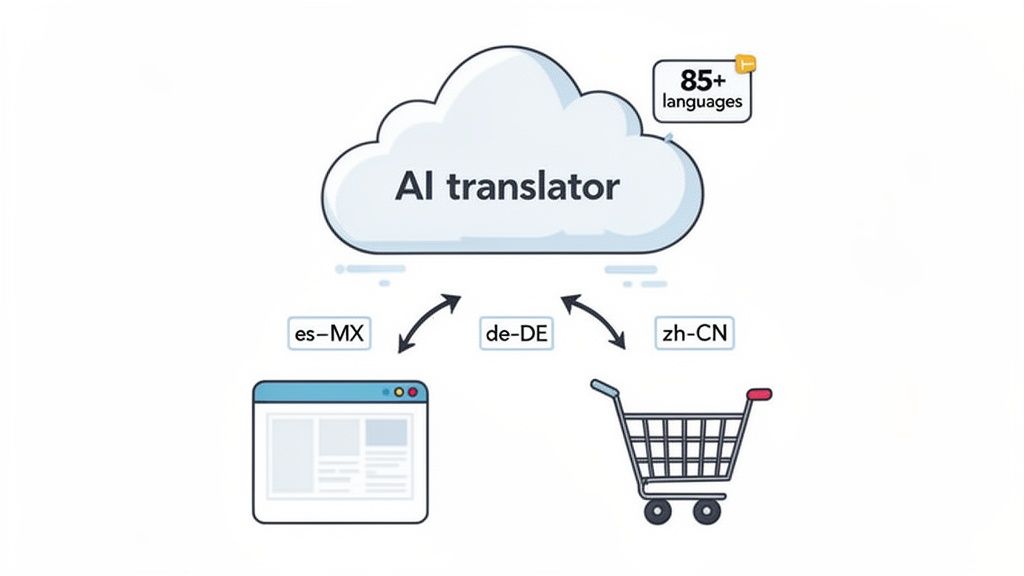
Let’s be honest: trying to manually manage dozens of locales is a surefire path to headaches and human error. Setting up the technical side is one thing, but actually filling each language version with high-quality, culturally sensitive content? That’s a whole different mountain to climb.
This is exactly where modern automation steps in. It’s the bridge between a brilliant global strategy and the practical reality of getting it done. AI-powered tools are now smart enough to hook directly into your site’s locale setup, completely sidestepping the slow, expensive grind of manual translation. It gives you the ability to translate your entire website accurately and in a fraction of the time. What used to be a months-long project can now be knocked out in just a few hours.
How AI Brings Your Multilingual Site to Life
Plugins like our own Polylang Automatic AI Translation take the locale data you’ve already defined and use it as a roadmap. It can translate your content into over 85 languages, but it’s not just swapping words. The technology is sophisticated enough to understand and respect the regional nuances that make content feel genuinely local.
For a digital agency, this is a game-changer. You can take on multilingual client projects without needing to hire a massive team of translators. If you run an e-commerce store, this is your fast-track to launching in new international markets with incredible speed.
Automation connects your carefully planned locale strategy to reality. It’s the engine that populates your global framework with meaningful content, allowing you to speak to the world without the traditional overhead.
The idea of a locale might have started on Unix systems back in the 1980s, but it truly came into its own with the web. With WordPress now powering a staggering 60.0% of all websites with a known CMS, the need for smart locale management is more urgent than ever. It’s the system quietly working behind the scenes on millions of sites, ensuring that content feels right for its cultural context.
And for the 93.7% of WordPress e-commerce sites running on platforms like WooCommerce, locales are mission-critical for displaying correct pricing, handling regional taxes, and ultimately, building customer trust.
A Perfect Fit for Your WordPress Workflow
The real magic here is how seamlessly this technology fits into the tools you’re already using. A good AI translation solution doesn’t force you to change how you work; it just makes your existing workflow smarter.
- WooCommerce Integration: It can automatically translate everything from product descriptions and attributes to categories, getting your entire store ready for a global audience.
- Elementor Compatibility: You can translate content built with page builders directly, keeping all your carefully crafted layouts and designs perfectly intact across every language.
- Custom Field Support: It even handles the “hidden” content, like data stored in plugins like Advanced Custom Fields (ACF), ensuring a completely consistent experience for every user.
By turning the translation process over to AI, you’re not just saving time and money. You’re giving your team a powerful, scalable way to manage a global online presence.
Ready to see it in action? Take a look at our complete guide on how to setup the Polylang AI Automatic Translation plugin and start building your multilingual site today.
Common Questions About Locales and WordPress
When you start taking your WordPress site global, a few common questions always seem to pop up. Getting your head around terms like localization and internationalization, and understanding how locales directly impact your site, is the first step. Let’s clear up the confusion with some practical, straightforward answers.
What’s the Difference Between Locale, Localization, and Internationalization?
These three terms get thrown around a lot, and it’s easy to think they mean the same thing. They don’t. They’re actually three distinct steps in the process of preparing a website for an international audience.
Think of it like building a house you want people from all over the world to visit.
-
Internationalization (i18n): This is the blueprint and construction phase. You’re designing the house with wiring that can handle different voltages and installing universal outlets. In web development, this means writing code that can easily adapt to various languages and regional formats without needing a complete overhaul for each new country. You’re building it to be ready for anything.
-
Localization (l10n): Now it’s time to furnish a room for a specific guest. If someone from the UK is staying, you provide an adapter for their 3-pin plugs. On your website, this is the actual work of translating your content, formatting dates like
dd/mm/yyyy, and using imagery that resonates with a British audience. -
Locale: The locale is the label on that specific adapter. The code
en-GBtells you this is for English (en) as spoken in Great Britain (GB). It’s the unique identifier that tells your flexible, internationalized website which set of localized content to show.
In a nutshell: internationalization is the foundation, localization is the adaptation, and the locale is the specific target for that adaptation.
How Do Locales Affect My Website’s SEO?
Locales are the absolute bedrock of a solid international SEO strategy. Search engines like Google need crystal-clear instructions to know which version of your content to show to which users. This is where locales, working inside hreflang tags, become your most valuable tool.
An hreflang tag is a simple piece of code you add to your page’s header. It acts like a directory, telling search engines about all the different language and regional versions of that specific page. For instance, a tag with the locale fr-CA signals that a page is meant for French speakers in Canada.
Getting your
hreflangtags and locale codes right is one of the most powerful things you can do for international SEO. It tells search engines exactly how to serve your content, preventing confusion and boosting your visibility in target markets.
Properly using locales gives your SEO a serious boost in three ways:
-
It avoids duplicate content issues. Without
hreflangtags, Google might see your U.S. and UK pages as lazy copies, which can hurt your rankings. Locales clarify they are intentional variations. - It improves the user experience. When a user from Mexico lands on a page with prices in pesos and local shipping info, they’re more likely to stick around. Lower bounce rates and higher engagement are powerful signals search engines love.
- It helps you rank in new markets. By clearly targeting specific regions, you dramatically improve your chances of showing up in local search results for your keywords.
Can I Use Multiple Locales on a Single WordPress Site?
Yes, you absolutely can—and you should! This is exactly how powerful multilingual websites are built in WordPress.
A default WordPress installation is designed to run on a single locale. But that’s just the starting point. The real magic comes from multilingual plugins.
Tools like Polylang are designed to turn a single-language site into a global powerhouse. They let you create and manage content for dozens of different locales, all from one WordPress dashboard. Each language you add is assigned its own locale, creating distinct, optimized versions of your pages, posts, and products.
Does Changing My WordPress Locale Automatically Translate My Content?
No. This is a super common point of confusion, so it’s worth being clear: changing your site’s language in the WordPress settings does not translate your content.
When you go to Settings > General and change the “Site Language,” you are only changing the language of the WordPress interface.
This translates the back-end text of WordPress itself—the words on buttons (“Publish,” “Update”), menu labels (“Posts,” “Pages”), and widget descriptions. It has zero effect on the content you’ve written. Your posts, pages, and product descriptions will all stay in their original language.
To translate your actual website content, you need a dedicated multilingual solution. A plugin like Polylang sets up the framework for managing multiple locales. Then, an add-on like the Polylang Automatic AI Translation plugin can do the heavy lifting of translating all that content into each target language you’ve set up.
Ready to stop managing translations manually and start reaching a global audience effortlessly? EPIC WP Solutions builds AI-powered plugins that automate the entire process. Discover how our Polylang Automatic AI Translation plugin can translate your entire WordPress site in hours, not months.