Taking your website global used to mean a long, drawn-out translation project. Not anymore. With modern AI, you can translate multiple languages and launch a fully localized site in a matter of minutes, automating the whole process right from your WordPress dashboard. This completely sidesteps the hefty price tags and slow turnarounds that come with traditional translation services.
Why AI Translation Is Now the Smart Choice
Manually translating a website has always been a major roadblock. Let’s be honest, it’s slow, it’s expensive, and it’s a nightmare to scale—especially if you have hundreds of pages or a sprawling WooCommerce store.
Hiring professional translators for every language you want to support can sink your budget fast. On the flip side, asking team members who aren't translation pros to handle it often results in clunky, inconsistent content. This old-school approach creates a serious bottleneck, stopping you from tapping into new markets when the opportunity arises.
The Shift to Automated Solutions
This is where AI-powered tools come in and change the game entirely. By hooking your WordPress site up to powerful AI engines like OpenAI or Claude, you can get translations almost instantly. And these aren't just word-for-word replacements; they’re surprisingly accurate and context-aware.
The market numbers back this up. The global language translation software market hit an estimated USD 68.04 billion in 2025 and is on track to balloon to USD 116.55 billion by 2035. This massive growth shows just how many businesses are ditching old methods for smarter, automated tools.
The real win with AI isn't just about speed. It's about making a multilingual website a realistic goal for everyone. What once demanded a dedicated team and a huge budget can now be done with a simple plugin. This levels the playing field, giving small and medium-sized businesses a fighting chance on the global stage.
How a Plugin Solves the Problem
For those of us on WordPress, the answer is a tool that acts as the bridge between our content and the AI. The Polylang Automatic AI Translation plugin was built from the ground up to do exactly this. It works with the well-known Polylang plugin to put the entire workflow on autopilot. Implementing multilingual AI support is a proven way for businesses to unlock new regions and keep customers happy.
This plugin takes care of everything—posts, pages, tricky WooCommerce products, and even custom fields. It sends your content to an AI for translation and then neatly places the translated version back into your site, creating a new language version automatically. You can dive deeper into the tech behind this in our guide on what is neural machine translation.
Ultimately, this smart integration gets rid of all the manual copy-pasting and ensures your site’s layout and structure stay perfectly consistent across every language.
Building Your Foundation with Polylang
Before we get to the fun part—the automatic translations—we need to lay a solid multilingual groundwork. This is where the free Polylang plugin steps in. Think of it as the essential framework that allows your WordPress site to handle multiple languages cleanly.
Getting started is as simple as installing any other plugin. Once you activate Polylang, its setup wizard will pop up and walk you through the most important first step: adding your languages. Whether you're targeting Spanish, German, French, or all three, this is where you tell WordPress which languages your site will officially support.
This is what you'll see when you get to the language selection screen in the wizard.
It's a straightforward interface. Just search for and add every language you plan to offer. This simple action forms the core of your entire multilingual structure.
Configuring for Users and SEO
With your languages in place, the next thing to think about is how people will find and switch between them. Polylang gives you a "language switcher" block that you can pop into your site’s menu, a sidebar widget, or anywhere else your theme allows. My advice? Stick it right in your main header where it’s impossible to miss. This makes life way easier for your international visitors.
Just as crucial is how search engines like Google will index your different language versions. Polylang is great at this, creating unique URLs for each language. You have a few choices, but the most common and SEO-friendly approach is using subdirectories (like yourdomain.com/de/ for German). This keeps everything neat and tells search engines exactly what's going on.
Pro Tip: When Polylang asks how to structure your URLs, always go with the subdirectory option. It's widely considered the best practice for multilingual SEO. It helps consolidate your domain authority and keeps your language versions perfectly organized under one roof.
Nailing this foundational setup is non-negotiable. Getting your languages, switcher, and URL structure right from the beginning saves you from a world of technical headaches down the road. It ensures that when you plug in the AI translation tool, it has a perfect, well-organized environment to work its magic.
For a deeper dive into these initial steps, check out our complete guide on how to set up the Polylang AI Automatic Translation plugin. Taking a few extra minutes here will make the next phase—unleashing the AI—incredibly smooth.
Bringing in the AI: Setting Up Your Translation Engine
With Polylang installed and your languages defined, you've built the foundation. Now for the exciting part—connecting your site to an AI brain that will handle the heavy lifting of translating your content. This is where the Polylang Automatic AI Translation plugin comes into play.
Think of this plugin as the bridge between your WordPress content and powerful AI models from providers like OpenAI, Anthropic (Claude), or Google (Gemini). Installing it is just like any other plugin, but the real magic happens in the configuration. This isn't just about flipping a switch; it's about teaching the AI how you want to work.
This diagram gives a great high-level view of the whole setup process, from the initial install to getting the language switcher live on your site.
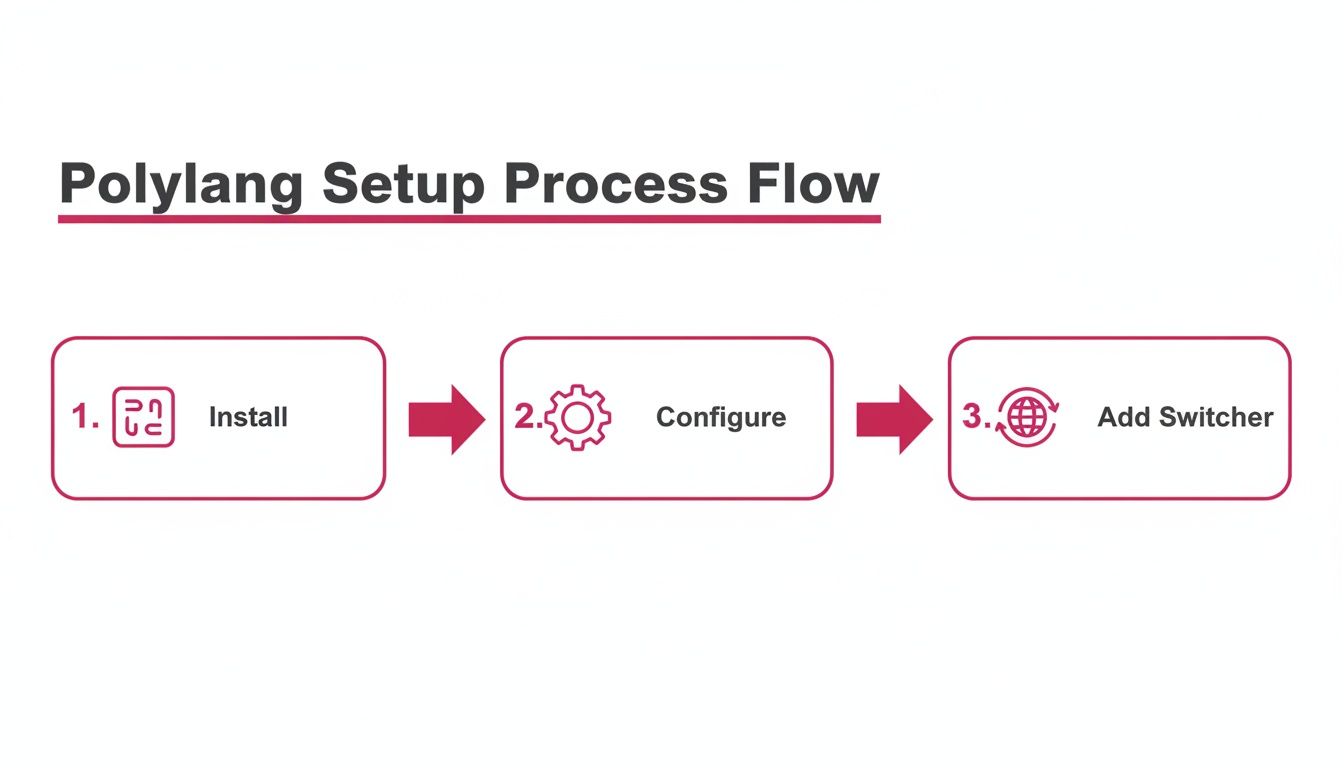
Getting this core structure right is what makes the AI integration so smooth and effective down the line.
Choosing Your AI Translation Engine
Once you've installed the plugin, the first big decision is which AI engine to use. Each has its strengths, and the best choice really depends on your content and budget. Some are better for creative marketing copy, while others excel at technical documentation.
Here’s a quick comparison to help you decide.
| AI Engine | Best For | Key Feature | Relative Cost |
|---|---|---|---|
| OpenAI GPT-4o | Balanced performance for general content, blog posts, and e-commerce. | Excellent blend of speed, high-quality output, and cost-effectiveness. | Mid-Range |
| Anthropic Claude 3 | Complex or nuanced content requiring a more "thoughtful" translation. | Strong contextual understanding and a more natural, human-like tone. | Higher |
| Google Gemini | Sites that need rapid translation for large volumes of content. | Fast processing speeds and a massive knowledge base for accuracy. | Lower-to-Mid |
There's no single "best" option here. My advice is to consider your primary content type. If you’re running a blog with a distinct voice, Claude might be worth the investment. For a large WooCommerce store with thousands of products, Gemini or GPT-4o could be more practical.
Connecting to the AI and Dialing in Your Settings
After you've picked an engine, you need to connect it to your site. This is done with an API key. Getting a key from a provider like OpenAI is usually a simple sign-up process. Once you have it, you just paste it into the designated field in the plugin’s settings. That one key unlocks the door to instant translations.
This is a game-changer, especially for businesses targeting diverse markets. The language services industry is huge for a reason—Europe alone holds a 42.50% global market share, a testament to the need to communicate across its 24 official EU languages. Tools like this are what make that possible. You can dive deeper into the market stats over at fortunebusinessinsights.com.
With the connection established, it's time to fine-tune your workflow. The plugin gives you a ton of control over how the automation works.
A few key settings you'll want to configure are:
-
Your Default Model: Pick the specific model you want to use, like
gpt-4oorclaude-3-opus. Different models offer different trade-offs between speed, cost, and quality. - The Translation Trigger: Do you want content translated the second you hit "Publish," or would you rather trigger it yourself with a manual click? The choice is yours.
- What Gets Translated: You can tell the plugin exactly which content types to handle, whether it's your blog posts, pages, or even your WooCommerce products.
My Go-To Tip for Getting Started: I always recommend starting with the "manual-click" option. It gives you a chance to get comfortable with the process. Translate a single blog post or one product, review the quality, and see how you like it. Once you’re confident in the results, you can switch to full automation and let it run in the background.
Spending just a few minutes on these settings can literally save you hundreds of hours in the long run. You're building a system that lets your site speak to the world, almost on autopilot.
Translating Your Entire Site in One Go
Alright, you've got your AI engine connected. Now for the fun part: putting it to work. This is where the real magic of the Polylang Automatic AI Translation plugin comes into play, letting you translate multiple languages across your entire site without the usual headache. It’s time to flip the switch and turn your single-language site into a platform ready for a global audience.
You have a couple of ways to tackle your existing content. You can either pick off items one by one or—and this is the game-changer—translate everything at once. This flexibility makes it a great fit whether you have ten pages or ten thousand.
Bulk Translating All Your Existing Content
Let's be realistic. If you're running a site with hundreds of blog posts, dozens of pages, and a full WooCommerce store, the idea of translating it all manually is a non-starter. That's precisely what the bulk translation feature is built for.
Just head over to your posts, pages, or products list in the WordPress dashboard. You'll spot some new options that let you select a whole batch of content and apply a translation action.
Here’s how it typically plays out:
- Grab your content: Start checking the boxes for all the posts or products you want to translate. You can grab everything on the current page or even select every single item in that content type.
- Pick your languages: Choose which new languages you want to create versions for.
- Let it run: One final click, and the plugin bundles everything up, sends it to your AI engine, and pulls back the translations, creating all the new language versions for you.
What I find most impressive is how deep the translation goes. It’s not just translating the body copy. It handles the critical SEO details—URL slugs, meta descriptions, and page titles—which is absolutely essential for actually ranking in search engines in new countries.
The demand for this is exploding. The translation services market is projected to hit a staggering USD 54.57 billion by 2035, largely because everyone needs to localize their digital content. AI tools are making this possible for website owners, compressing what used to be a weeks-long project into a few minutes. If you're running an agency, this completely changes the game by cutting down turnaround times and seriously boosting your clients' multilingual SEO. You can read more about the growth of the translation market on globalmarketstatistics.com.
Putting Future Content on Autopilot
The bulk feature is perfect for catching up, but what about everything you create from now on? This is where the automatic mode really shines. Just enable the "Automatic Translation" setting, and you’ve basically created a "set it and forget it" workflow.
Once this mode is active, the second you hit "Publish" on a new blog post or product, the plugin immediately sends it off to be translated into all the languages you've set up.
Think about a WooCommerce store owner launching a new product. You write up the perfect description in English, add all the specs, and set up variations for size and color. The moment you publish it, the plugin is already working. Within minutes, your Spanish, French, and German versions are live, complete with translated descriptions, attributes, and all the right SEO metadata. No extra steps, no waiting around. It's just seamless, instant localization, making sure your global customers see your latest offerings at the exact same time as everyone else.
Tackling Page Builders and Custom Fields
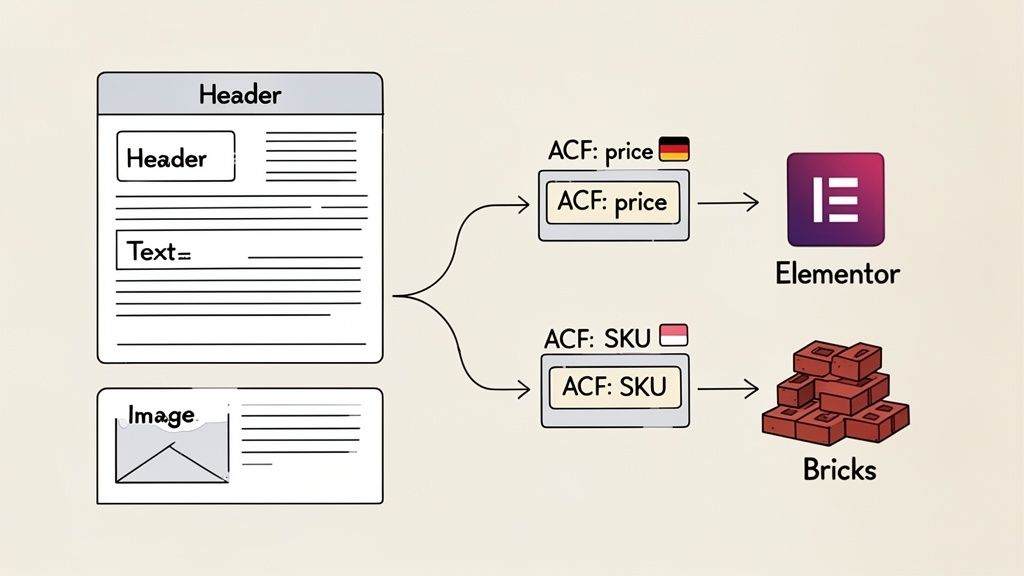
Let's be honest, modern WordPress sites are rarely just a simple block of text and a few images. They’re complex, beautiful layouts built with page builders like Elementor or Bricks, and they often use custom fields to handle all sorts of unique data. This is precisely where most translation efforts fall apart.
Digging through page builder widgets one by one or manually hunting down custom field data to copy and paste is a recipe for disaster. It's tedious, slow, and full of opportunities for human error. It’s also one of the biggest reasons businesses give up on the idea to translate multiple languages.
This is the exact problem the Polylang Automatic AI Translation plugin was built to solve. It doesn’t just see the main body content; it’s smart enough to find and translate the text tucked away inside your page builder modules and custom fields.
Seamless Page Builder Integration
It doesn't matter if you're using Elementor, Bricks, Beaver Builder, or Avada—the plugin is designed to work with their internal structures. When you kick off a translation, it scans every single element on the page.
It knows how to find and translate text hidden inside:
- Headings and text editor widgets
- Button labels and calls-to-action
- Image captions and alt text
- Even custom-coded HTML blocks
What this means in practice is that your meticulously designed landing pages get replicated perfectly in every new language. The design stays intact. You won't find yourself pulling your hair out trying to fix broken layouts or restyle translated sections. The visual experience remains consistent across your entire multilingual site.
Automating Custom Field Translations
For any site that’s more than a simple blog—especially e-commerce stores or business directories—the really important information often lives in custom fields. We use tools like Advanced Custom Fields (ACF) to store everything from product prices and SKUs to specific event dates and business locations.
Manually translating this kind of metadata is not only a headache, but it’s often overlooked. Yet, it’s absolutely critical for a truly localized user experience.
The plugin completely automates this. It locates the text stored in your ACF fields and sends it to the AI for translation right along with the main post content.
Here's a real-world example I see all the time: a WooCommerce product that uses ACF to create custom tabs for things like "Specifications" or "Shipping Details." The plugin doesn't just translate the main product description; it also finds and translates the content within those custom tabs. This ensures every single piece of information a customer sees is in their own language, which is a massive factor in building trust and driving sales.
This deep integration saves an incredible amount of time and gets rid of the risk of missing those crucial, but hidden, pieces of data. If your site leans heavily on custom fields, you can get the full rundown in our guide to ACF automatic translation with AI.
A Smart Workflow for Quality Control
AI translation gets you remarkably close to perfect, but that last 10% is where the magic happens. A strategic human touch adds the final polish that builds real trust with your global audience. The goal isn't to get bogged down re-translating everything by hand; it’s about creating a smart, efficient review process that protects your brand's voice.
First things first: prioritize. Let's be realistic—you probably don't need to meticulously proofread every single blog post from three years ago. Instead, focus your energy where it counts most. Your homepage, core product or service pages, and the entire checkout flow are the heavy hitters. Get these right, and you've won half the battle.
Having a native speaker give this high-value content a quick once-over can be a game-changer. They'll catch subtle cultural nuances or slightly awkward phrasing that an AI, no matter how good, might miss. This simple check makes a massive difference in how professionally your brand comes across.
Protecting Your Brand and Technical Terms
One of the classic headaches when you translate multiple languages is dealing with brand-specific terminology. Your company name, product names, or unique taglines should almost never be translated. This is where the Polylang Automatic AI Translation plugin really shines with its built-in "Glossary" feature.
You can create a list of words and phrases that should never be changed, no matter the language. This is also incredibly useful for technical terms or industry acronyms that are already universally understood in their original form.
For instance, a tech company might add its product "CloudSync," the term "API," and its own company name to the glossary. This simple step ensures that when a page is translated into Spanish or Japanese, these key terms are preserved perfectly, avoiding confusing literal translations and keeping your brand consistent.
Thinking about these kinds of processes is key. Integrating powerful workflow automation examples beyond just translation can seriously boost your team's efficiency and overall quality control.
Building Your Pre-Launch Checklist
Okay, before you hit the big red button and announce your new multilingual site to the world, it's time for a quick pre-launch check. This final pass gives you the confidence that everything is working exactly as it should.
Here are the non-negotiables for your checklist:
-
Hreflang Tag Verification: Grab a free online
hreflangchecker and test a few of your most important pages. These tags are what tell Google which language is for which audience—getting this wrong is a huge multilingual SEO mistake. - Language Switcher Test: Click around your site like a real user would. Does the language switcher work smoothly? Does it take you to the correct translated version of the exact page you're on? It needs to be seamless.
- User Experience Flow: Put on your customer hat and walk through a typical journey in one of the new languages. If you're running a WooCommerce store, that means actually adding a product to the cart, going to the cart page, and starting the checkout process. This is the fastest way to spot any untranslated text strings or clunky steps.
This simple workflow—prioritizing key pages, protecting your brand terms, and running a final check—is the bridge between AI's incredible speed and the nuanced quality your customers expect.
Still Have Questions? Let's Clear Things Up
When you're thinking about using AI to handle your site's translations, a few common questions always pop up. Here are the answers I usually give to folks weighing their options.
How Does AI Translation Stack Up Against a Human?
This is the big one, right? Modern AI models like GPT-4o and Claude 3 have gotten shockingly good. For many common language pairs, they deliver accuracy that's nearly indistinguishable from a human, especially because they grasp context so well. The output just sounds natural.
Now, if you're dealing with super technical jargon or a really nuanced marketing campaign, I'd still recommend a quick once-over by a native speaker. The beauty of the Polylang Automatic AI Translation plugin is that it makes this step a breeze. You can easily tweak any AI-generated text right inside WordPress, giving you that perfect mix of AI's incredible speed and a human's final touch.
Is This Going to Mess Up My SEO?
It's actually designed to do the exact opposite—this plugin is a huge boost for your multilingual SEO. It takes care of all the little details that search engines need to see, automatically translating crucial elements like:
- URL slugs
- SEO titles
- Meta descriptions
The most important thing it handles is implementing
hreflangtags correctly. These tags are non-negotiable for multilingual sites. They tell Google, "Hey, this is the Spanish version of that English page," which helps you rank in the right regions and, critically, avoids any penalties for duplicate content.
What About My Page Builder Content? Does It Translate Elementor?
Absolutely. This is one of its biggest strengths. It plays nicely with all the major page builders, including Elementor, Bricks, Beaver Builder, and Avada.
The plugin is smart enough to dig into your layouts, find the text hiding in all those different widgets and design modules, and translate it on the spot. Your carefully designed pages will look just as good in every language, without you having to manually copy and paste a single thing.
I've Already Done Some Translations by Hand. What Happens to Them?
No worries there. The plugin is built with real-world workflows in mind. By default, it will not overwrite any of your existing manual translations.
You can use the bulk translate feature to target only the posts, pages, or products that are missing translations. It lets you slot AI right into your current setup, preserving all the hard work you've already put in.
Ready to put your translation workflow on autopilot and open your site to the world? The EPIC WP Solutions Polylang AI Automatic Translation plugin is hands-down the fastest way to get your entire WordPress and WooCommerce site speaking multiple languages.